Here’s a quick tip to output multiple shapes with Thinking Particles. This may sound like an easy task, but it’s actually a bit tricky.
There are a number of ways to do this. For example, you can clone objects onto particles, but then you lose the Thinking Particles rotations and interactions you may want. There is a Multishape Emitter preset in the Content Browser that ships with Cinema 4D, but it’s far more complex than necessary and adding additional objects becomes a pain.
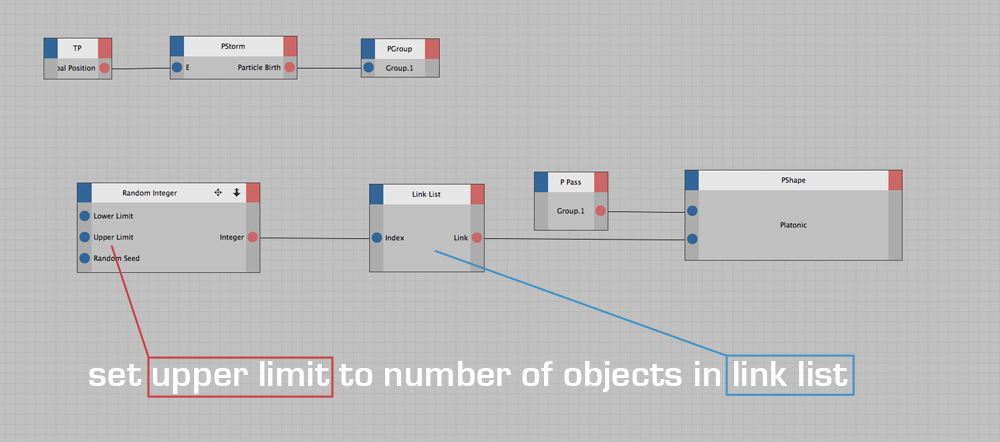
Because of that, I made a simple setup that lets you add as many objects as you want quickly. There are really only two steps:
1. Add all objects you want to the link list.
2. Set the Random Integer upper limit to the number of objects in the link list minus 1 (since counting starts at zero).
Notes & Gotchas
A couple of common Thinking Particles issues to watch out for:
-
If your shapes aren’t showing up, make sure you’ve added a Particle Geometry object.
-
Ensure the emitter’s Size value is high enough to actually see the shapes.
-
If you render a single frame in the Picture Viewer, you’ll see the same shape on all particles.
This happens because the system never gets a chance to assign different shapes. -
This setup will work correctly when rendering an image sequence starting from the emission frame.
-
If you need a still image, render directly in the viewport and grab a screen capture.
Download:
Download the scene file from the Alpha Pixel freebies section.