Quick Tip: Reverse Dynamics in C4D

Here's a quick tip on reversing a cached dynamic simulations. It's pretty simple to do but it's sort of hidden away in different menus. The downside of this method is that it will reverse ALL of the dynamics cached. You won't have control over which dynamics its applies to.
Step 1
Create Dynamic Simulation and Cache all dynamics in dynamics tag.
Step 2
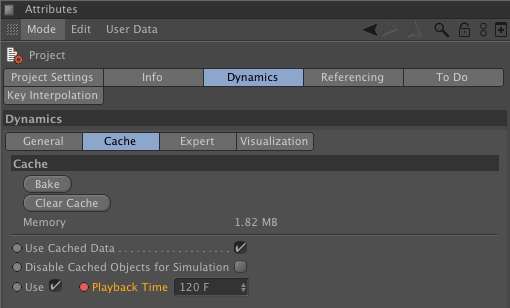
Go to Project Settings(Ctrl + D)>Dynamics>Cache tab.
Step 3
Turn on "Use" check box at bottom.
Step 4
Keyframe the Playback Time where you want your dynamics to start from(probably a frame later in the scene) and then later in the timeline set another keyframe when they're settled(probably a frame early in the scene). So you should really be key framing from a high number to a lower number to see the dynamics reversed.