
CINEMA 4D • FREE PRESET
Free Cinema 4D
Studio Preset.
A cleaner starting point for your next render.
This free Cinema 4D studio preset gives you an adjustable curved backdrop for product shots, object previews and motion graphics. Shape the floor-to-wall transition, resize the space around your subject, and add a ceiling or side wall from one Studio Options panel.
The download contains AP_Studio.c4d, a reusable Cinema 4D scene. Open it, select AP Studio in the Object Manager, and tailor the backdrop to your composition. Add your own objects, materials, lights and camera to build the final look.
Free resource from the Alpha Pixel library. Confirm your email to unlock downloads.
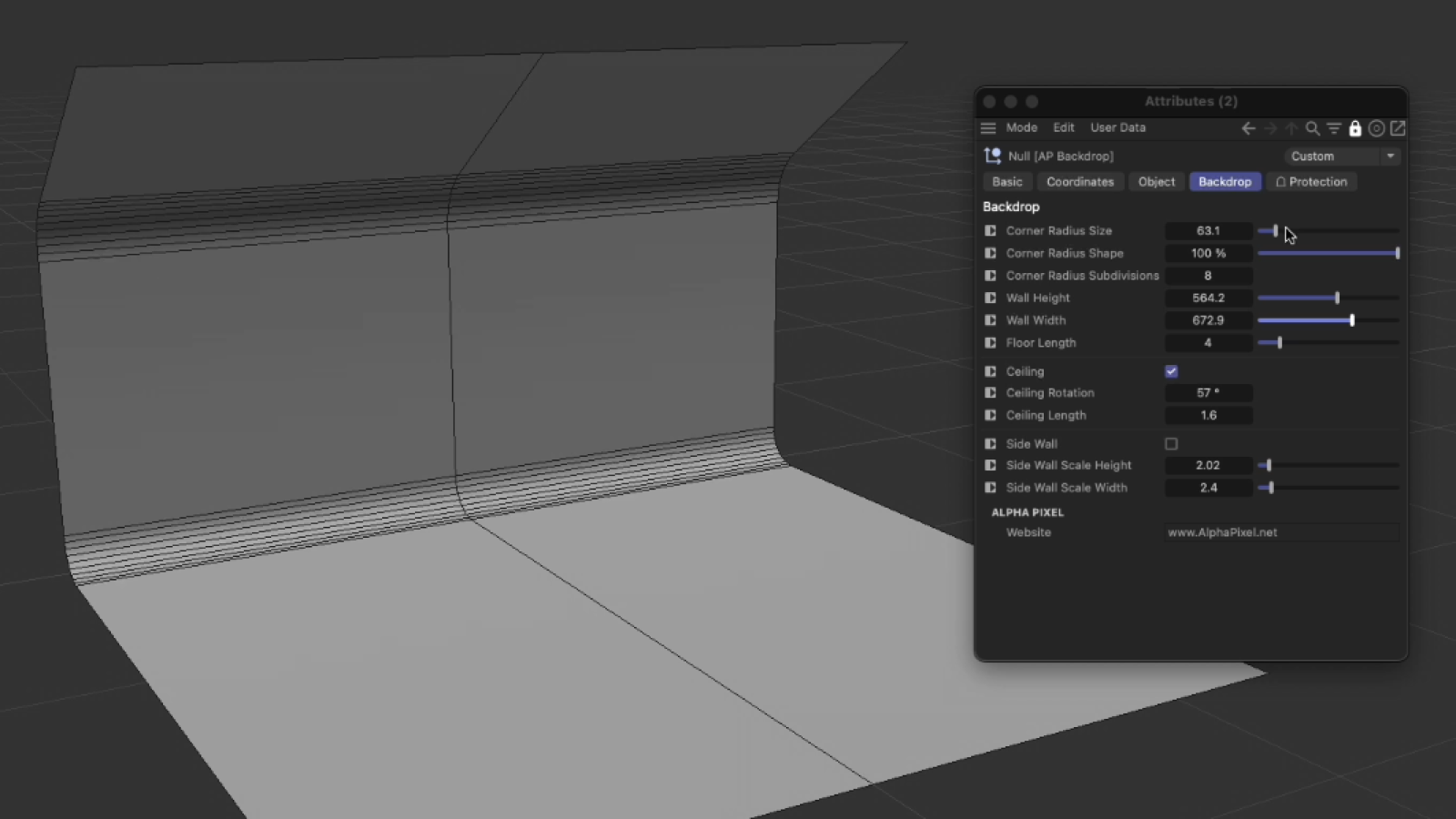
AP Studio — adjustable backdrop and Studio Options controls in Cinema 4D.
FREE RESOURCE
AT A GLANCE
Cinema 4D studio preset
at a glance.
Adjust Corner Radius Size and Corner Radius Shape to change the curved transition.
Set Corner Radius Subdivisions to control how smoothly that curve is built.
Resize Wall Height, Wall Width and Floor Length around your subject.
Switch on the Ceiling, then adjust its rotation and length.
Enable a Side Wall and change its height and width scale.
Open the included .c4d scene directly; this is a backdrop preset, not a plugin installer.
Built for your workflow
A closer look.
Shape the backdrop around your subject, then build your own lighting.
YOUR SCENE, YOUR LOOK
Start with a base.
Make it your own.
Select AP Studio and open Studio Options in the Attribute Manager. Start with Wall Height, Wall Width and Floor Length to give your object enough room in the frame.
Use Corner Radius Size and Corner Radius Shape to tune the floor-to-wall transition. Corner Radius Subdivisions controls the curve’s segmentation. Check the silhouette and shading from the camera angle you plan to use.
For an enclosed composition, enable Ceiling or Side Wall. The ceiling has rotation and length controls; the side wall has separate height and width scales. These are backdrop controls, so choose lighting, camera framing and render settings for your own scene.
Adjustable curve
Ceiling + side wall
Reusable scene
AP Studio — adjustable backdrop and Studio Options controls in Cinema 4D.
START HERE
Use your C4D
studio backdrop.
- Get the download. Join the Alpha Pixel newsletter and confirm your email. Use the freebie password on the downloads page and find C4D Studio.
- Extract the ZIP. The archive contains AP_Studio.c4d. Open that scene in Cinema 4D rather than placing it in a plugins folder.
- Save a working copy. Keep the original scene available for the next project. Bring your subject into the working scene and select AP Studio to adjust the backdrop.
- Compose and test. Set up your camera, materials and lights. Check that the backdrop fills the frame, and make a small test render before committing to a final image or animation.
GOOD TO KNOW
Studio preset
questions.
Is this a plugin or a scene preset?
It is a Cinema 4D scene preset supplied as a .c4d file. You can open the file and use the AP Studio object’s Studio Options panel; there is no separate plugin installation step for this download.
Does it include a finished lighting setup?
The supplied scene contains the adjustable backdrop and an information object. Treat it as a starting point for your own lighting and camera work, rather than a finished product-render scene.
What should I change first?
Frame your subject, then set the wall dimensions and floor length. Adjust the curved transition after the composition is established. Turn on the optional ceiling or side wall only when the shot needs them.
Which Cinema 4D versions and renderers are supported?
The supplied file was opened and its Studio Options panel checked in Cinema 4D 2024. That is an opening check, not a complete compatibility or rendering test. No broader version range or renderer guarantee is listed here.
How do I access the free Cinema 4D preset?
Newsletter subscribers use the password-protected freebie downloads page. If you are new, sign up and confirm your email first. The access buttons on this page take you to the correct place.
A little less setup.
A lot more creating.
Join the newsletter to unlock the freebie library. Confirm your email first, then use your password on the downloads page.
KEEP EXPLORING
More freebies.


Plugin
Drop To Floor 1.5
Place objects and hierarchies on the workplane in one click.