
FROM LEARN / FIELD NOTES
Data Stream:
Cinema 4D motion graphics.
Data Stream is a Cinema 4D motion graphics project created for the Target Fall National. This case study shows three original style frames and a look inside a spline-driven Thinking Particles setup. It represents one section of the project, rather than the complete piece.
The central idea was reusability: change the spline to get a different animation, while the camera follows the stream’s leading edge and adds random movement. Xpresso controls made the setup easier to adjust during production.

01 / EXPLORE THE WORKFLOW
One spline.
A different animation.
The original description explains that Thinking Particles are generated along a spline, with most of the visible elements cloned onto the particles. Changing that path changes the animation’s shape, so a new direction does not require rebuilding every element separately.
The camera follows the head of the stream, with random movement added for a less orderly feel. That gives the sequence a moving viewpoint as well as moving geometry. The spline, particle stream and camera therefore need to be considered together when evaluating the shot.
The setup screenshot below shows the project’s original User Data controls, including particle count, spread, spin, camera offset, tail length and a spline link. These are evidence of how this particular scene was organized; they are not a downloadable preset or a complete tutorial for rebuilding its node network.
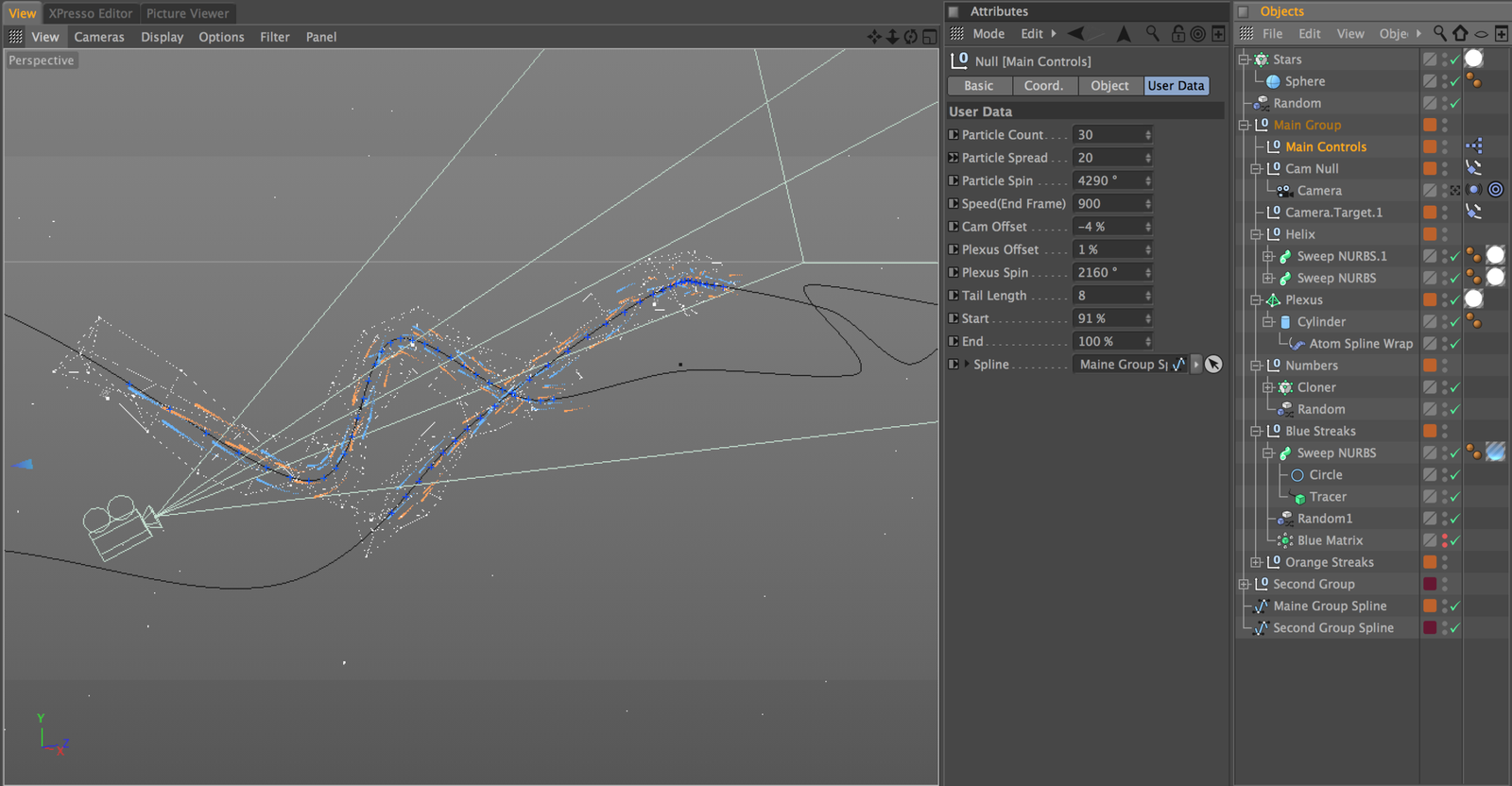
Original scene layout and controls. This is a project reference, not a step-by-step node diagram.
02 / EXPLORE THE WORKFLOW
Three looks.
One project.
Bars: a light red-and-white composition with rings, repeated bars and a central cluster.
Stream: bright blue and orange trails, numbers and connected points on a dark field.
Earth lines: colored routes and bright endpoints arranged around a globe.

Stream — original project style frame.

Earth lines — original project style frame.
03 / EXPLORE THE WORKFLOW
Read the scene.
Then explore the idea.
Separate the path from the appearance
The path determines where the stream travels. Cloned elements, lines, numbers and their visual treatment determine how it reads. Keeping those decisions separate is a useful way to study procedural animation: inspect the movement first, then evaluate density, contrast and detail.
Build related particle knowledge
For a smaller Thinking Particles example, see the multishape emitter setup. It explains a Link List, random shape selection and Particle Geometry. It is a separate lesson, not the source rig for this project.
Keep exploration practical
Compare the three frames for direction, repeated forms and contrast before adding detail to your own scene. Alpha Pixel’s Cinema 4D tutorials cover related motion design techniques, while the 3D tools collection offers workflow tools for other parts of a project.
04 / EXPLORE THE WORKFLOW
Data Stream
project questions.
Is this the complete Target piece?
No. The original post describes a snippet from one section and shares three style frames plus a setup screenshot.
What drives the variation?
The spline path changes the animation. Thinking Particles and cloned elements follow that structure, while Xpresso exposes controls for adjustment.
Is a project download included?
The original article did not supply one. Use these images and notes as a visual case study, not a promise of a scene file.
Does it demonstrate today’s particle system?
This is the original Thinking Particles workflow. It does not verify compatibility with every current Cinema 4D release.