
Hide and
Seek.
For Cinema 4D.
Hide and Seek is a powerful workflow and scene management plugin for Cinema 4D that helps you quickly create, manage, and reuse complex object and tag selections. Designed for large and detailed scenes, Hide and Seek keeps you organized and efficient when working with hundreds or thousands of objects in Cinema 4D.
By allowing you to search, filter, hide, reveal, and cycle through selections instantly, Hide and Seek removes the frustration of manual scene navigation and helps you stay focused on creative work.
$15
Cinema 4D 2024–2026
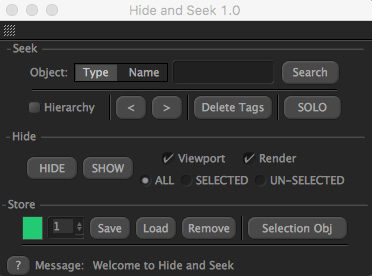
Hide and Seek — directly in Cinema 4D.
AT A GLANCE
Hide and Seek core features.
- Create complex object/tag selections easily based on an object’s type or name
- Modify selections globally or step through them one by one
- Search scene-wide or within specific hierarchies
- Quickly hide, reveal, or solo your selections
- Save selections and return to them anytime
Built for your workflow
A closer look.
Less time searching.
More time creating.
Create complex selections
Find exactly
what you need.
Hide and Seek makes building advanced selections fast and intuitive. You can create selections based on object type, object name, or hierarchy position, making it easy to isolate exactly what you need in even the most complex scenes.
For example, you can instantly select all splines, only helix splines, or only editable splines, all with simple text-based searches.
Object type
Object name
Hierarchy
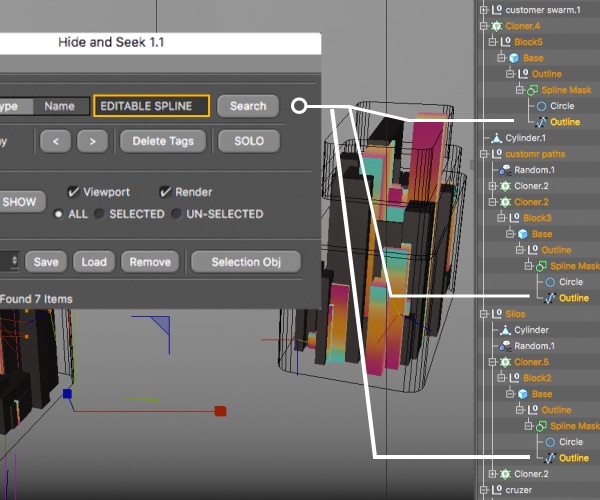
Hide and Seek in Cinema 4D.
Full tag search support
Tags included.
Nothing missed.
Hide and Seek also works with tags. By including the word “Tag” in your search, you can locate and select specific tags across your entire scene.
This makes it easy to find missing texture tags, compositing tags, render tags, or any other tag type, and quickly modify or delete them as needed.
Corona
Redshift
Octane
Vray
Xparticles
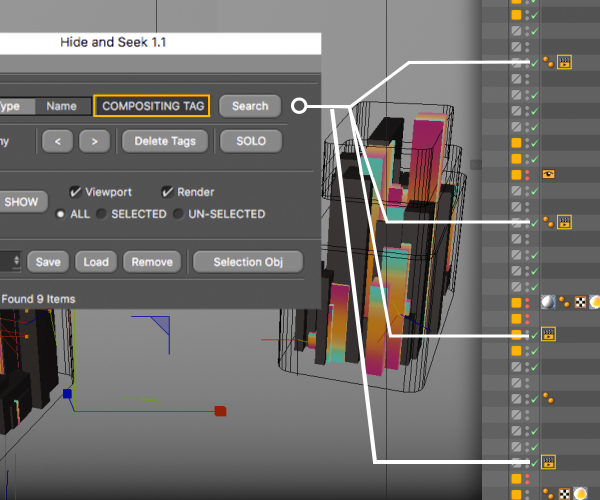
Hide and Seek in Cinema 4D.
Visibility and fine control
Focus your scene.
Once a selection is created, Hide and Seek lets you cycle through objects one at a time using built-in navigation controls. You can adjust parameters globally in the Attribute Manager or fine-tune individual objects without losing your selection.
Hide
Reveal
Solo

Hide and Seek in Cinema 4D.
Save and reuse selections
Find it once.
Use it again.
Hide and Seek allows you to save selections so you can return to them at any time. Saved selections can be recalled instantly, helping you maintain consistency throughout your project.
Selections can also be stored using Cinema 4D’s native Selection Objects, giving you multiple ways to manage and reuse your work.
Saved selections
Selection Objects

Hide and Seek in Cinema 4D.
Compatibility
Check your setup.
Hide and Seek 1.3
Cinema 4D
2024
2025
2026
Listed support
✓
✓
✓
English interface. Search support includes Corona, Redshift, Octane, Vray and Xparticles.
Your next scene starts here.
A more focused way to work with complex Cinema 4D scenes.
$15
A few things before you dive in.
Can I search objects and tags?
Yes. Search objects by name or type, and include “Tag” in a search to locate tags across a scene or hierarchy.
Can I reuse selections?
Yes. Save and recall selections, or store them using Cinema 4D Selection Objects. The interface is currently available in English.
Release history
January 11, 2026 — Cinema 4D 2026 support.
September 30, 2023 — Cinema 4D 2024+ support.
September 27, 2020 — R23 support.
November 11, 2019 — Third-party renderer search support and saving/loading fixes for R21.
November 8, 2019 — Updated search for R21 objects.